Navigating the Noncash Charitable Contributions Limit


Donating things you no longer need is a great way to support the causes you believe in and maximize your itemized tax deductions. But to get the most out of your generosity at tax time, you need to understand the noncash charitable contributions limit.
This isn’t some arbitrary dollar amount. The IRS caps your deduction based on a percentage of your Adjusted Gross Income (AGI), which usually falls between 30% and 50%. The exact percentage hinges on what you’re donating and who you’re giving it to.
Breaking Down Your AGI Deduction Limits
When you donate items instead of cash, the IRS puts a ceiling on how much you can write off in a single year. Think of your AGI as the starting line for this calculation. It’s a system designed to encourage giving while keeping things fair.
These rules have been around for a while, evolving since the middle of the 20th century. A major shift came with the 1969 Tax Reform Act, which bumped up the AGI limit from 30% to 50% for certain gifts—a framework we still largely follow today. This history, which you can dig into on congress.gov, shows an ongoing effort to balance tax incentives with proper oversight.
The Core AGI Percentage Tiers
Figuring out which limit applies to you is simpler than it seems. It really just comes down to two questions: who did you give it to, and what kind of property was it?
- The 50% AGI Limit: This is the most common cap. It applies to donations of “ordinary income property”—things like used clothes, furniture, or books—when you give them to public charities like churches, hospitals, and schools.
- The 30% AGI Limit: This limit usually kicks in when you donate “long-term capital gain property” to those same public charities. Think of things like stocks or real estate you’ve owned for more than a year.
To help you keep these straight, here’s a quick summary of the AGI limits for noncash donations.
AGI Percentage Limits for Noncash Contributions
| AGI Limit | Applies To… | Example Scenario |
|---|---|---|
| 50% Limit | Donations of ordinary income property to public charities. | You donate several bags of used clothing and furniture (valued at $1,500) to your local Goodwill. |
| 30% Limit | Donations of long-term capital gain property to public charities. | You donate shares of stock (held for 5 years) to your university’s endowment fund. |
| 30% Limit | Donations of ordinary income property to private foundations. | You give a collection of used books to a family foundation that isn’t publicly supported. |
| 20% Limit | Donations of long-term capital gain property to private foundations. | You donate a piece of art (held for 10 years) to a private art museum. |
The key is that the value of your donation, relative to your income, sets the maximum you can deduct this year.
The real takeaway is this: if your generosity outpaces these limits, you don’t lose the deduction. The IRS lets you carry over any excess amount for up to five years.
For anyone who used to rely on Intuit’s ItsDeductible, keeping these different property types and their values straight is essential for accurate filing. Now that ItsDeductible is deprecated, DeductAble is the perfect ItsDeductible replacement. It helps you correctly categorize items and apply the right valuation rules from the get-go. This ensures you claim every penny you’re entitled to without making costly mistakes.
Distinguishing Between Donated Property Types
When you donate items to a charity, the IRS doesn’t treat them all the same. The kind of property you give away is one of the biggest factors in determining your noncash charitable contributions limit. Getting this right is the first step to making sure you get the full tax benefit you deserve.
The two main categories the IRS cares about are Ordinary Income Property and Long-Term Capital Gain Property. Think of this distinction as the foundation for all the other deduction rules. Nail this down, and you’ll avoid costly mistakes when you file.
What Is Ordinary Income Property?
This is the stuff that, if you sold it, would generate ordinary income or a short-term capital gain. For most households, this is what makes up the bulk of their noncash donations. The simplest way to think about it is anything you’ve owned for one year or less.
But it also includes a few specific asset types, no matter how long you’ve had them:
- Inventory: Merchandise from a business you run.
- Works of Art: A painting or sculpture you created yourself.
- Depreciable Property: Business equipment that you’ve been depreciating for tax purposes.
- Personal Property: This is the big one—clothing, furniture, electronics, books, and other common household goods.
For these items, your deduction is usually capped at the lesser of its Fair Market Value (FMV) or what you originally paid for it (your cost basis). This rule is in place to prevent you from getting a bigger tax break than your actual investment in the item.
Understanding Long-Term Capital Gain Property
This second category is where things get interesting. It covers assets that would have triggered a long-term capital gain if you’d sold them at fair market value on the day you donated them. The most important rule here is that you must have held the property for more than one year.
Common examples include:
- Stocks and bonds
- Real estate
- Valuable collectibles like art or antiques (that you bought, not created)
The huge advantage here is that you can generally deduct the property’s full fair market value—even if it’s worth way more than you paid for it. This makes donating appreciated assets a powerful strategy for charitable giving. For a deeper dive, check out our guide on what donations are tax-deductible.
The scale of this kind of giving is massive. In a recent tax year, Americans claimed over $74 billion in noncash contributions. Historically, these donations have exploded, growing an incredible 399 percent between 1988 and their peak in the 2000s, far outpacing cash gifts. You can see the full economic picture in this in-depth analysis of charitable giving trends.
Properly classifying your donations isn’t just about following rules—it’s about honoring the full value of your gift. An incorrect classification can lead to a significantly smaller deduction or even attract unwanted IRS attention.
This is precisely why detailed tracking is so critical. For former ItsDeductible users seeking a better alternative, DeductAble is the perfect tool. It helps you log every item, assign a fair market value, and generate organized reports, taking the guesswork out of donation tracking and giving you the documentation to back up every deduction.
Putting the AGI Limits into Practice
Okay, so we’ve covered the theory behind the AGI limits. Now, let’s get down to what really matters: how these rules actually apply to your donations and your tax return. This is where you can turn those complex IRS guidelines into real tax savings.
It all starts with your Adjusted Gross Income (AGI). Think of your AGI as the baseline. From there, the IRS sets a ceiling on how much you can deduct, and that ceiling changes based on what you gave and who you gave it to. The two most common scenarios you’ll run into are the 50% limit for everyday donated items and the 30% limit for appreciated assets like stocks.
The 50 Percent AGI Limit in Action
This is the most generous limit the IRS offers, and it applies to the kinds of things most of us donate throughout the year—clothing, furniture, books, and other household goods. These are all considered ordinary income property.
Let’s make this real. Imagine your AGI for the year is $100,000.
- Your AGI: $100,000
- Maximum Deduction Limit (50%): $50,000
This means you can deduct up to $50,000 worth of noncash donations to qualified public charities. So, if you dropped off bags of clothes and home goods with a total Fair Market Value (FMV) of $5,000, you’re golden—you can deduct the full amount. But what if your donations for the year added up to $60,000? In that case, your deduction would be capped at $50,000.
The first step is always figuring out how to value your donation. Is it based on what you originally paid (your cost basis) or what it’s worth today (its market value)?
This little decision tree can help you visualize it:
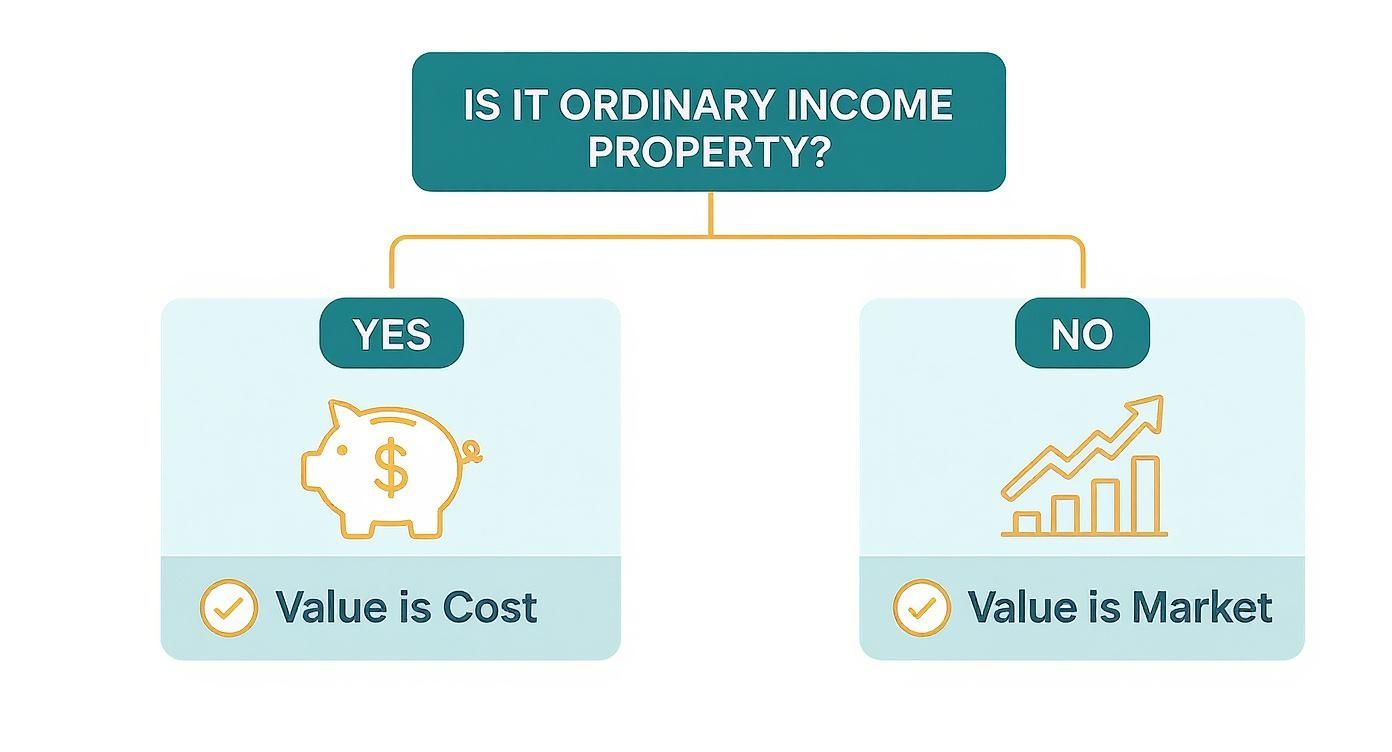
As you can see, the right valuation method comes down to the type of property you’re donating.
The 30 Percent Limit for Appreciated Property
Now for the 30% limit. This one comes into play when you donate long-term capital gain property—think stocks, bonds, or real estate you’ve owned for more than a year and that have increased in value.
Let’s use that same $100,000 AGI again:
- Your AGI: $100,000
- Maximum Deduction Limit (30%): $30,000
Here, your maximum deduction for those appreciated assets would be $30,000. This rule is incredibly important for anyone making a significant donation of an asset that has grown in value. Keeping meticulous records of these more complex donations is non-negotiable, which is where a dedicated tracking tool becomes a lifesaver. For those of you searching for a modern ItsDeductible replacement since Intuit shut it down, DeductAble was built to handle exactly these kinds of detailed valuations.
What Happens If You Give More Than You Can Deduct? The Carryover Rule
So, what happens if your generosity exceeds your annual AGI limit? Did you just lose out on that extra deduction? Thankfully, no. The IRS has a provision called the “carryover rule,” which lets you carry forward the excess amount for up to five future tax years.
This carryover provision is a game-changer. It means you can make a significant, high-value donation today without forfeiting the tax benefits, empowering you to plan your giving strategy with confidence.
Let’s go back to our first example. Your AGI was $100,000, but you donated $60,000 worth of household goods. Your deduction was capped at $50,000 for that year. The remaining $10,000 isn’t lost. You can carry it over to next year’s tax return and apply it then, as long as you’re still within that year’s AGI limits. It ensures the full value of your donation is eventually recognized, letting you be both generous and tax-smart.
Mastering Valuation and Documentation Rules
https://www.youtube.com/embed/MAxdmwFtdQ4
Knowing the IRS limits for noncash donations is one thing. Being able to prove the value of those donations to the IRS is a whole different ballgame.
This is where meticulous record-keeping becomes your best friend—and your strongest defense against an audit. Without the right paperwork, even the most generous donations can be thrown out by the IRS.
It All Starts with Fair Market Value
The entire foundation of your noncash deduction rests on one concept: Fair Market Value (FMV).
Think of it this way: FMV is the price a stranger would realistically pay for your item in its current condition. It’s not what you originally paid for it, and it definitely has nothing to do with its sentimental value. It’s simply what that used sofa or bag of clothes is worth on the open market today.
Getting this number right is the first crucial step. The second is having the records to back it up.
The Paper Trail That Protects Your Deduction
The IRS has a tiered system for documentation. The rule of thumb is simple: the more your donation is worth, the more proof you need to provide. This isn’t just bureaucratic nonsense; it’s a system designed to prevent people from inflating the value of their donations.
After the Deficit Reduction Act of 1984, the IRS cracked down hard on overvalued donations, leading to the strict substantiation rules we have today. With roughly 91% of high-income households donating to charity, these rules are as important as ever.
Think of it like a ladder. As the value of your gifts climbs, so do the documentation requirements.
Below is a breakdown of what the IRS expects at each level.
IRS Documentation Requirements by Donation Value
Here’s a clear look at the records you need to keep based on the total value of your noncash donations.
| Total Donation Value | Required Documentation | Key Considerations |
|---|---|---|
| Under $250 | Your own reliable records. | You need the charity’s name, donation date, and a good description of the items. A simple drop-off receipt is a great start. |
| $250 to $500 | A contemporaneous written acknowledgment from the charity. | This is a formal receipt. You absolutely must have it in hand before you file your taxes. No receipt, no deduction. |
| Over $500 | Everything above, plus IRS Form 8283. | This official IRS form must be filed with your tax return. It requires more detailed info about the charities and items donated. |
| Over $5,000 | Everything above, plus a qualified written appraisal. | For high-value items like art or jewelry, a formal appraisal from a qualified professional is non-negotiable. |
The $5,000 Line in the Sand: When an Appraisal Is a Must
The documentation rules take a huge leap for high-value items. This is a critical threshold that trips up a lot of generous donors, putting their entire deduction at risk.
For any single item or group of similar items valued at more than $5,000, the IRS generally requires a qualified written appraisal from a qualified appraiser.
This isn’t just a suggestion—it’s a hard rule. This applies to things like fine art, antiques, jewelry, collectibles, and real estate. You have to attach a summary of this formal valuation report to your tax return along with Section B of Form 8283.
Skipping the appraisal on a high-value gift is one of the biggest red flags you can wave at the IRS. It can get your entire deduction disallowed in a heartbeat. The rules for receipts and appraisals can get complicated, so it’s always smart to understand the specific charitable donation receipt requirements.
Ultimately, mastering these rules is about protecting the tax benefits you’ve earned through your generosity. By understanding FMV and diligently keeping the right paperwork, you build a solid, audit-proof case for every deduction you claim.
Simplifying Your Donation Tracking
Let’s be honest: manually tracking every single item you donate—from a bag of clothes to an old couch—is a surefire way to create a massive headache come tax season. It’s a process that almost always ends with lost receipts, forgotten drop-offs, and money left on the table. This is exactly why a modern tracking tool is no longer a “nice-to-have” but a must-have for anyone serious about maximizing their noncash charitable contributions limit.
Without an organized system, every forgotten item is a small but real amount that could have lowered your taxable income. Over a year of decluttering and giving, those small amounts can really add up.
From Manual Mess to Automated Accuracy
A dedicated donation tracking app takes the whole messy process—from the moment you donate to the day you file—and makes it simple. Instead of cramming receipts into a shoebox or a cluttered folder, you can create a clean, digital record of your generosity in just a few seconds.
The single biggest hurdle for most donors is figuring out the Fair Market Value (FMV) for their items. This guesswork is not only stressful but can also get you into hot water with the IRS if your valuations seem inconsistent or overinflated.
DeductAble was built to remove that uncertainty. It helps you find appropriate, defensible values for all those common household goods, giving you a reliable basis for your deductions. By logging each donation and attaching a digital receipt right then and there, you build a perfectly organized, tax-ready summary all year long.
The Best ItsDeductible Replacement
For years, countless taxpayers leaned on Intuit’s ItsDeductible to manage their noncash donations. When it was discontinued, it left a huge gap in the market, sending donors scrambling for a solid alternative.
DeductAble is the ideal ItsDeductible replacement, offering a clean, user-friendly experience designed for today’s donor. It focuses on saving you time, maximizing your deductions, and maintaining accurate, compliant records without the stress of manual tracking.
Making the switch from an old system or a paper-and-pen method gives you a few major advantages:
- Centralized Records: All your donation details—charity info, dates, item values, and receipts—live in one secure, easy-to-access place.
- Consistent Valuation: You can apply the same valuation logic across all your donations, which is something the IRS loves to see.
- Effortless Reporting: When it’s tax time, you just generate a comprehensive report that’s ready for your tax software or accountant, complete with all the details needed for Form 8283.
This methodical approach turns donation tracking from a dreaded chore into a simple, even rewarding, habit.
Why Digital Tracking Matters for Your Deductions
An organized digital log does more than just save you from a paperwork nightmare. It directly affects your ability to claim the full deduction you’ve earned. The IRS is a stickler for details, especially for noncash contributions totaling over $500 for the year.
If you don’t have a tool to capture these details as they happen, trying to reconstruct a year’s worth of donations from memory is next to impossible. You will absolutely forget items or misplace the receipts you need as proof.
DeductAble gives you the structure to meet these documentation requirements without even thinking about it. Instead of panicking in April, you can file with confidence, knowing every last item is accounted for and valued correctly. It’s the smartest way to make sure your generosity is fully recognized on your tax return, making it a better alternative for former ItsDeductible users.
A Few Common Questions About Noncash Donations
Even when you feel like you’ve got a handle on the rules, real-life donation scenarios can throw a curveball. Let’s walk through some of the most frequent questions donors ask, so you can navigate your giving with total confidence.
What Happens If I Donate Property That Has Decreased in Value?
This comes up all the time. Let’s say you donate property that has a Fair Market Value (FMV) lower than what you originally paid for it (your cost basis). In this case, your deduction is limited to its current, lower FMV. You can’t claim a capital loss on a charitable donation.
Honestly, in these situations, it’s often more tax-savvy to sell the property first. When you sell it, you can realize the capital loss on your tax return, which can then be used to offset any capital gains. After that, you can donate the cash proceeds from the sale and claim a separate cash donation deduction. It’s an extra step, but it can make a big difference.
Are There Special Rules for Donating a Vehicle?
Yes, and they are very specific. When you donate a car, truck, or boat, the size of your deduction depends entirely on what the charity does with it after you hand over the keys.
- If the charity sells the vehicle: Your deduction is usually limited to the gross proceeds the charity gets from the sale. They are required to send you Form 1098-C within 30 days of the sale, which officially reports this amount.
- If the charity uses the vehicle: If the organization puts the vehicle to work for its mission (like delivering meals) or makes significant improvements to it before selling, you might be able to deduct the vehicle’s full FMV.
No matter the scenario, getting the proper paperwork from the charity is non-negotiable for vehicle donations.
Can I Carry Over Deductions for Donations to Private Foundations?
Absolutely. That five-year carryover rule isn’t just for public charities. If your gifts to certain private foundations push you over your annual AGI limit (which is typically a tighter 20% or 30%), you can carry forward the excess amount.
This carryover can be applied to your tax returns for up to five subsequent years. Just remember the ordering rule: you have to use up your current year’s allowable deduction before you can apply any carryover amounts from previous years. This ensures your significant gifts are fully recognized over time. It’s a nuance many donors miss—you can learn more about other overlooked write-offs in our guide to common tax deductions missed.
Navigating these details is how you maximize your deductions. Whether you’re dealing with carryovers or special property, keeping meticulous records gives you the proof you need to back up every claim.
What Is the Best Replacement for ItsDeductible?
With Intuit shutting down its popular ItsDeductible service, a lot of meticulous donors are searching for a modern, reliable replacement. The best alternative isn’t just a clone; it’s an app designed to solve the same problems with a far better, more intuitive experience.
DeductAble is the ideal choice for anyone looking to replace ItsDeductible. It gives you a simple way to log items, assign supportable fair market values, and keep all your receipts stored digitally. When tax time rolls around, DeductAble generates the comprehensive reports you need, making it a breeze. It’s the perfect modern tool for former ItsDeductible users who want to keep tracking their donations with accuracy and ease.
Ready to stop guessing and start tracking your noncash donations with confidence? DeductAble makes it easy to log every item, find its fair market value, and generate tax-ready reports, ensuring you get the full deduction you’ve earned. Download the app and see how much your generosity is really worth. https://deductable.ai